# .claude Folder ⭐⭐
{% code title="" overflow="wrap" lineNumbers="true" %}
```
your-project/
├── CLAUDE.md # Main project instructions
├── CLAUDE.local.md # Personal overrides (not committed)
└── .claude/
├── settings.json # Control layer
├── rules/ # Modular instructions
├── hooks/ # Automation scripts
├── commands/ # Reusable prompt workflows
├── skills/ # Packaged capabilities
└── agents/ # Specialized subagents
```
{% endcode %}
{% code title="" overflow="wrap" lineNumbers="true" %}
```
your-project/
├── CLAUDE.md
├── CLAUDE.local.md
└── .claude/
├── settings.json
├── settings.local.json
├── rules/
│ ├── backend.md
│ ├── frontend.md
│ ├── testing.md
│ └── security.md
├── hooks/
│ ├── block-dangerous-commands.sh
│ ├── format-edits.sh
│ └── run-checks-before-stop.sh
├── commands/
│ ├── review-pr.md
│ ├── write-tests.md
│ └── summarize-changes.md
├── skills/
│ └── release-prep/
│ ├── SKILL.md
│ └── release-template.md
└── agents/
├── code-reviewer.md
└── security-auditor.md
```
{% endcode %}
***A simple way to think about it is this:***
* **CLAUDE.md:** explains how the project works
* **settings.json:** controls how Claude operates in the project
* The **subfolders** exist to keep everything else organized
That separation is useful because these files serve different purposes. **CLAUDE.md** is about guidance. **settings.json** is about control. One tells Claude what matters in the codebase. The other shapes what Claude is allowed to do and what automatic behaviors should happen around its work.
For example, in a FastAPI project, **CLAUDE.md** might explain that all API schemas live in **schemas/,** all service logic lives in **services/**, and every endpoint should validate inputs with Pydantic models.
Meanwhile, **.claude/settings.json** might allow Claude to run test commands, deny access to **.env** files, and trigger a formatting hook after file edits. Those two files work together, but they should not be mixed together.
The top level should also make a clear distinction between shared files and personal overrides. A shared **CLAUDE.md** belongs in the root because the whole team benefits from it.
A personal override, such as **CLAUDE.local.md,** is different. It exists for local preferences and should stay out of the team’s shared structure. The same logic applies to **settings.local.json** inside **.claude/**.
In other words, the top level should answer the biggest questions first. What does Claude need to know about this project? What is Claude allowed to do here? Everything else can be organized underneath that foundation.
{% content-ref url="/pages/jphe2ml69IO8bE8h0GFF" %}
[CLAUDE.md vs rules/ ⭐⭐](/claude-code-handbook-sumonta056/basics/.claude-folder/claude.md-vs-rules.md)
{% endcontent-ref %}
{% content-ref url="/pages/PbYb0GukRhiS4qCHdRal" %}
[Getting Started](/claude-code-handbook-sumonta056/getting-started/readme.md)
{% endcontent-ref %}
{% content-ref url="/pages/L0m8V9r7DtahreExqmGG" %}
[The role of commands/](/claude-code-handbook-sumonta056/basics/.claude-folder/the-role-of-commands.md)
{% endcontent-ref %}
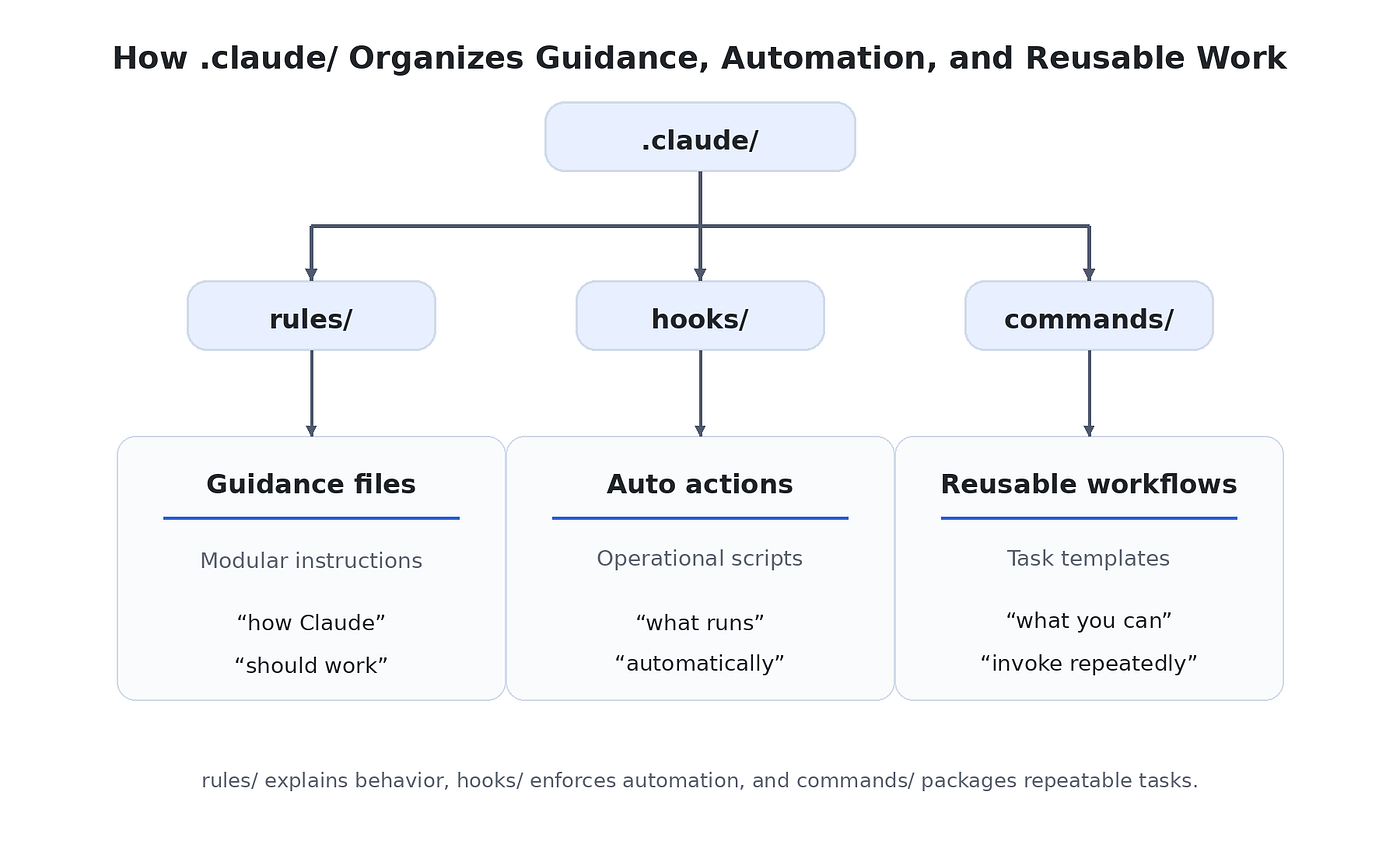
A cleaner pattern is:
* `CLAUDE.md` explains the project
* `rules/` refines guidance
* `hooks/` contains automatic operational scripts
* `commands/` contains reusable prompt workflows
That division makes the folder easier to scan, easier to extend, and easier for teammates to understand.
#### Folder/code-tree visual
Here is a visual you can place in the article:
```
.claude/
├── settings.json
├── rules/
│ ├── frontend.md
│ ├── backend-api.md
│ └── testing.md
├── hooks/
│ ├── block-dangerous-commands.sh
│ ├── format-edits.sh
│ └── run-tests-before-stop.sh
└── commands/
├── review-pr.md
├── write-tests.md
└── summarize-changes.md
```
This works well because it shows that **hooks/** and **commands/** sit beside the instruction layer, not inside it.
Press enter or click to view image in full size
{% content-ref url="/pages/U9OId21QU4LMixoZSnOq" %}
[When should use skills/ & agents/?](/claude-code-handbook-sumonta056/basics/.claude-folder/when-should-use-skills-and-agents.md)
{% endcontent-ref %}
{% hint style="info" %}
### A useful way to think about the blueprint is as a progression:
* Start with **CLAUDE.md** and **settings.json**
* Add **rules/** when one instruction file stops scaling
* Add **hooks/** when you need automation or enforcement
* Add **commands/** when prompts become repetitive
* Add **skills/** when workflows become deeper
* Add **agents/** when specialization clearly improves results
{% endhint %}
***
Special thanks to this article :
{% embed url="" %}
{% hint style="success" %}
**A small request:**
Would You like donate a small amount : [**Click Here**](https://forms.gle/S1FJaEpzGcnMQbm77)
*If you find value in what we’re doing, please **subscribe to My YouTube channel** & Newsletter and **share this initiative** with others in your network. Together, we can build a stronger tech community.*
**Want to learn a topic like this? \[**[**Subscribe to My YouTube Channel**](https://www.youtube.com/@LearnCodewithPS5638)**]**
**Code & Career Golpo Newsletter:** [Subscribe to My Newsletter](https://www.linkedin.com/newsletters/code-career-golpo-7309186050084544512/)
{% endhint %}
---
# Agent Instructions: Querying This Documentation
If you need additional information that is not directly available in this page, you can query the documentation dynamically by asking a question.
Perform an HTTP GET request on the current page URL with the `ask` query parameter:
```
GET https://sumontas-organization.gitbook.io/claude-code-handbook-sumonta056/basics/.claude-folder.md?ask=
```
The question should be specific, self-contained, and written in natural language.
The response will contain a direct answer to the question and relevant excerpts and sources from the documentation.
Use this mechanism when the answer is not explicitly present in the current page, you need clarification or additional context, or you want to retrieve related documentation sections.